Comparing Diffusion with SignalR
December 5, 2025 | DiffusionData
Introduction
SignalR is an open-source library for ASP.Net Core developers that facilitates real-time communication between client and server allowing server-side code to push content to clients instantly. It supports multiple communication protocols, including WebSockets.
Diffusion specializes in real-time data management and distribution across a network. Diffusion delivers data under all network conditions with its reliable session reconnection. Diffusion’s delta streaming provides efficient transmission of data thus enabling it to scale well to handle many subscribers.
SignalR and Diffusion are both used for applications that require high-frequency updates, like chat applications, gaming, or live data feeds. As you will see Diffusion offers many more features than SignalR.
Server-Client Communication
SignalR
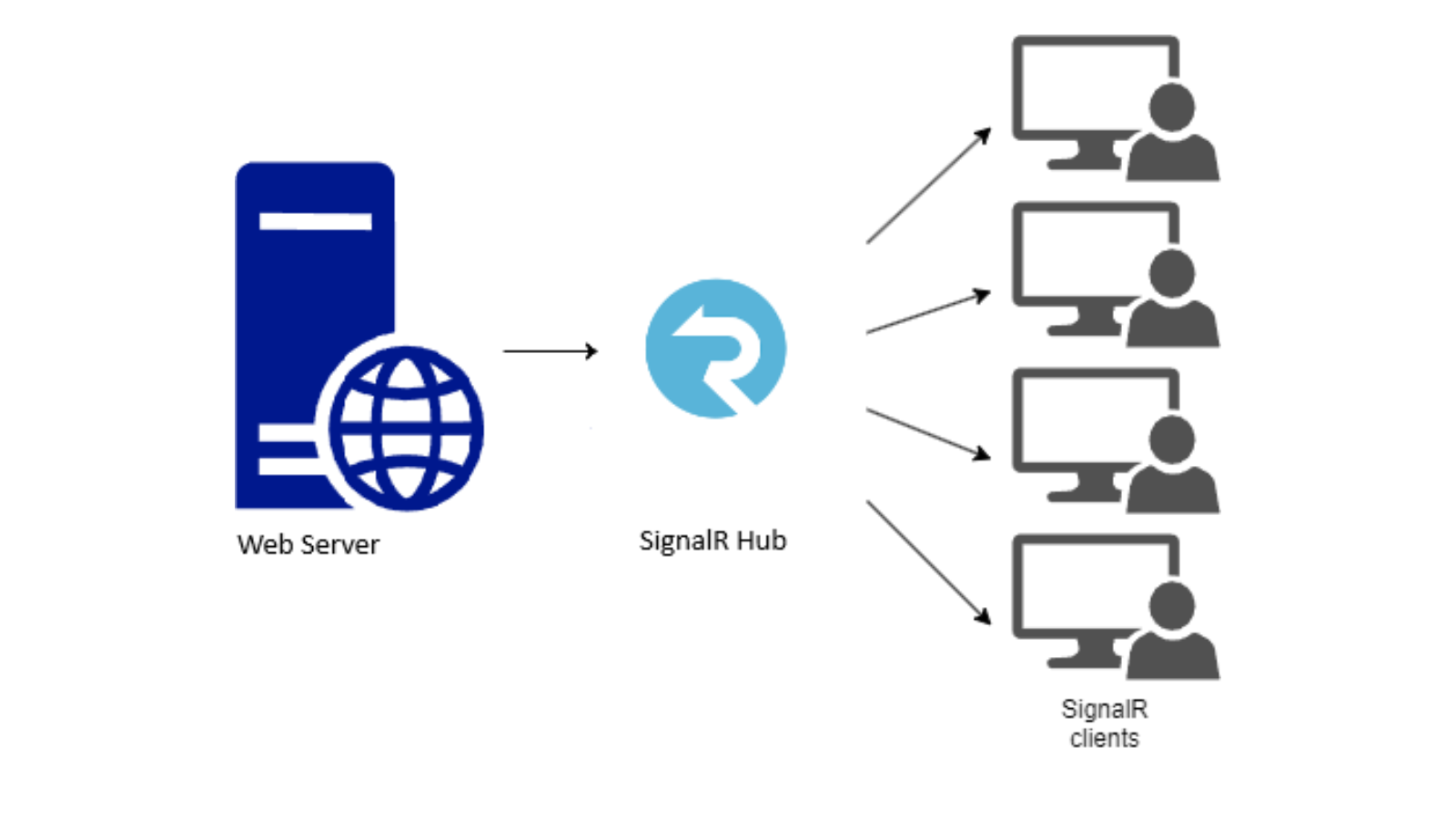
The SignalR server and its clients communicate via the SignalR hub as shown below.
SignalR Server-Client Communication
The code below shows how the ASP.Net core website uses on-prem SignalR to send messages to connected clients.
1. The Hub interface defines the method ‘ReceiveMessage’ that is used by the hub class wrapper ‘SignalRHub’.
    public interface IHubClient
    {
        Task ReceiveMessage(string message);
    }
    public class SignalRHub : Hub
    {
       // Optional methods
    }
2. The web site controller sends messages to clients connected to the hub.
    public class HomeController : Controller
    {
        private readonly IHubContext hubContext;
        public HomeController(IHubContext hubContext) => this.hubContext = hubContext;
        public async Task Index()
        {
            await hubContext.Clients.All.SendAsync("ReceiveMessage", "Starting messaging...");
            return View();
        }
    ...
3. The web application includes the SignalR service when it begins (see Program.cs below).
    var builder = WebApplication.CreateBuilder(args);
    builder.Services.AddSignalR();
    var app = builder.Build();
    app.MapHub("/signalRHub", options =>
    {
    options.Transports = HttpTransportType.WebSockets;
    ...
    });
    ...
    app.Run();
4. The SignalR client creates a hub connection and specifies a callback to receive the data as shown below.
      var hubConnection = new HubConnectionBuilder()
                                .WithUrl(serverUrl)
                                .Build();
      hubConnection.On("ReceiveMessage",
          message =>
          {
              Console.WriteLine($"Message: {message} received.");
          });
      await hubConnection.StartAsync();
Diffusion
The Diffusion control client (publisher) communicates with its clients (subscribers) as shown below.

Diffusion Server-Client Communication
The code below shows how the publisher sends messages to subscribers.
1. The publisher establishes a session with the Diffusion server.
2. The publisher creates a topic, in this case a JSON topic, on a topic path e.g. ‘Stock’ then sets it with data.
   await session.TopicControl.AddTopicAsync(topicPath, TopicType.JSON);
   var updateStream = session.TopicUpdate.NewUpdateStreamBuilder().Build(topicPath);
   await updateStream.SetAsync(value);
3. The subscriber establishes a session with the Diffusion server.
4. The subscriber creates a value stream to receive data and subscribes to the path ‘Stock’.
   session.Topics.AddStream(topicPath, new ValueStream());
   await session.Topics.SubscribeAsync(topicPath);
5. The value stream receives data from the server as shown below.
    public class ValueStream : IValueStream
    {
    public void OnValue(string topicPath, ITopicSpecification specification, IJSON oldValue, IJSON newValue)
    {
        LOG.Info($"Value received {newValue.ToJSONString()} on path {topicPath}.");
    }
Points of comparison
| SignalR | Diffusion | |
|---|---|---|
| Solution Type | Open source real-time library or Cloud-based service on Azure | On-prem and cloud-based solution |
| Scalability | Scale on-prem with Redis or use the Azure SignalR Service | Use Diffusion Servers in an edge-layer |
| Guaranteed message ordering | No | Yes |
| Reconnections with continuity | Provides automatic reconnections, but some messages may never get delivered upon reconnection. | Provides automatic reconnections, but some messages may never get delivered upon reconnection. |
| Protocols |
WebSockets HTTP Long polling Server-Sent Events |
WebSockets HTTP Long polling MQTT |
| Multiplexing | Yes | Yes |
| Integrations | SignalR is able to integrate with Azure. It can integrate with Redis for horizontal scaling. |
Diffusion is able to integrate with Kafka, Redis and Excel as well as message brokers that support AMQP 1.0. Diffusion offers REST API and can also connect to IoT devices through the MQTT protocol. |
| Message history/persistence | No | Yes |
| Broadcast (1:many messaging) | Yes | Yes |
| Streaming | Yes | Yes |
| SDKs | .NET, Java, JavaScript, Python, Swift | .NET, Java, JavaScript, TypeScript, Python, C, iOS |
| Delta Compression | No | Yes |
| Data Types | Primitive types, JSON, binary MessagePack | Primitive types, JSON, binary, Time Series |
Benefits of Diffusion
1. Topic Views – Low-code Topic Views can easily transform and map incoming data.
- Topic Views can aggregate multiple incoming values into one topic, expand a single incoming data point and generate subtopics, as well as tailor data for delivery.
- Copy all or part of the topic tree on one server to another with Remote Topic Views. Ideal for distributing data across a geographically dispersed user base.
- Topic Views can be used to create a delayed feed and are ideal for creating lower-value versions of time-sensitive data.
- SignalR does not offer Topic View functionality.
2. Diffusion updates for any given topic are guaranteed to be in order (but updates for different topics can be received in any order).
3. Diffusion is designed to efficiently distribute data by sending only the data that is required to subscribers, rather than sending everything. It categorizes and splits data into a hierarchical topic tree.
4. Diffusion provides message history through its Time Series Topics feature – This allows you to store and access a historical sequence of events, which is useful for applications that require tracking changes over time. It stores a time-stamped event within a single topic and streams events as they happen or queries to retrieve part of a series.
5. Diffusion supports delta compression – The platform includes a delta-streaming protocol that intelligently distinguishes between old, updated and new data, only sending recent, relevant, information to clients instead of the entire topic content. This enables up to 90% reduction in server and bandwidth requirements by avoiding the need to send data that isn’t changing from one update to the next.
6. Diffusion provides pre-built adapters such as Kafka, REST, Redis and CDC (Change Data Capture) and gives you the ability to create your own.
7. Diffusion can integrate with RabbitMQ, Solace and ActiveMQ that support the AMQP 1.0 protocol.
8. Diffusion includes the MQTT protocol that enables direct connection to IoT devices using MQTT 5.0.
Summary
Diffusion offers many more features than SignalR:
-
Diffusion has support for message ordering, message history and delta compression.
-
Diffusion can be integrated with more products such as message brokers that support AMQP 1.0 and offers REST API along with the MQTT protocol to connect to IoT devices.
-
Diffusion’s Topic Views allow for easy transformation and mapping of incoming data.
For more information see our site.
Disclaimer: This comparison was created based on documentation and resources freely available online about SignalR. The content was last updated on 27 Nov 2025. Be sure to double-check everything before you make any decisions. If you do find anything incorrect or out of date, then please let us know.